Skip site navigation
Division of Research
About Proposal Development News and Training Sponsored Research Toolbox Forms
Contact Us FAQs Roles and Responsibilities Vision / Mission Staff Directory
Administrative Cost Designations Budget Guidance Limited Submissions Locating Funding Sponsor Tips Sponsored Research Handbook Using SciENcv @ UMD Quick Reference Guide
Announcements
Pre-Award Policies & Procedures Post-Award Policies & Procedures Federal Resources Contact Information UMD Resources UMD Systems Lifecycle of Sponsored Projects
Award Management Federal Forms UMD Forms
About Proposal Development News and Training Forms

Historic Data - Printing to PDF

How to Download Tableau Dashboards to PDF at ORA’s website

To print a Tableau dashboard or workbook:

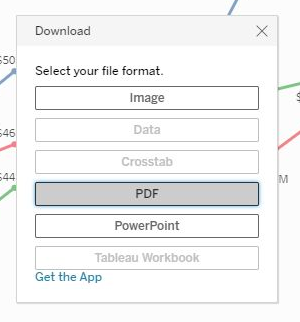
  1. Click "Download" from the menu at the bottom-right of the Tableau dashboard.

     
  2. Click the "PDF" button.
     
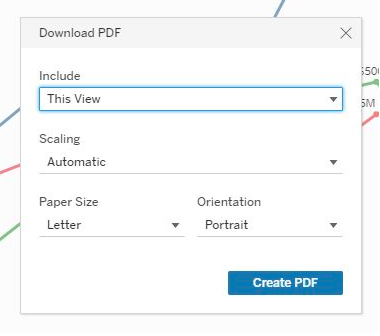
  3. Make optional selections for Scaling, Paper Size, and Orientation. Most dashboards workbooks are formatted, by default, for landscape and letter. Click Create PDF to generate the PDF file.
     
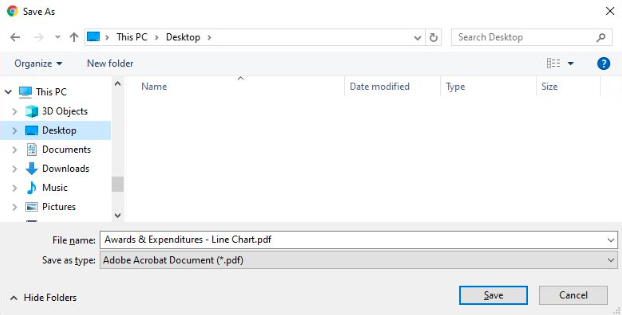
  4. Save the file to a directory:
     
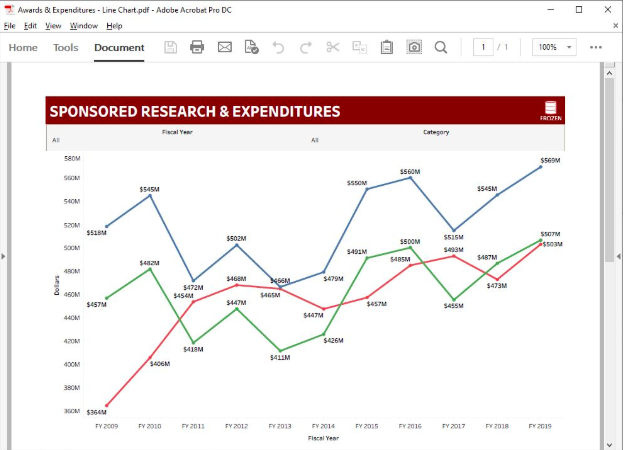
  5. Open the PDF file within your browser or preferred PDF viewer, and print as you would any PDF document.